
Vidu AI Image to Video Review for 2026
I spent $47 across 11 days testing Vidu AI image to video so you don't have to guess whether the character reference hype is real.
Dora here — this isn't a typical Vidu review. I went in skeptical. "Character consistency" gets thrown around by every AI video tool right now, and it usually just means the face didn't completely melt between frames — which is a pretty low bar.
But I needed a real answer for a specific workflow: serialized short-form content where the same character appears across 8–12 clips. If Vidu's reference system holds up at that scale, it changes the math on how I build content pools. If it doesn't, it's another tool that works in demo conditions and falls apart in production.
Here's what I found — including where it failed.
What Vidu Is
Shengshu's Vidu Model Versions in 2026
Vidu is built by Shengshu Technology, a Beijing-based startup founded by Tsinghua University researchers and backed by Baidu and Ant Group. The Vidu video model family has iterated quickly. Vidu 1.0 launched with a Universal Vision Transformer (U-ViT) architecture supporting 1080p output. Vidu 2.0 cut generation time to under 10 seconds. The current flagship, Vidu Q3, adds native audio — sound effects and ambient audio generate alongside the video, not as a separate step. Q3 also introduced a "Spicy" tier for bolder, more expressive motion.
As of May 2026, the platform supports text-to-video, image-to-video, and reference-to-video, with durations up to 16 seconds at up to 1080p.
What Makes Vidu Different — Character Reference Feature
The Vidu character reference system (also called "My References") lets you upload 3–7 images of a character or object. The model maintains visual consistency across generated clips. Save a named reference profile once — upload three angles of the same character — and every future generation pulls from that profile without re-uploading.
Most generators don't do this, or do a weak version where the face drifts after 2–3 clips. Vidu's multi-reference architecture is specifically designed to hold subject identity stable across multiple shots. The question is whether it actually works at production volume.
Access and Pricing
Free Credits and Daily Limits
The free tier gives 80 credits per month — roughly 20 standard generations. There's also unlimited off-peak generation: slower queue, no credit cost. For testing purposes, off-peak is sufficient. Quality difference from standard is minimal; it's purely a waiting issue. No credit card required to start.
Paid Plans and API
Standard runs $10/month (or $8 annual) for 800 credits. Premium is $35/month for 4,000 credits. Ultimate is $99/month for 8,000 credits and up to 200 videos per day.
At 4 credits per video, the $10 Standard plan covers about 200 videos per month — significantly cheaper than Runway's comparable tier. API access is available for teams building automated workflows; worth calculating separately if that's your use case.
Vidu I2V Tested
Basic Image-to-Motion
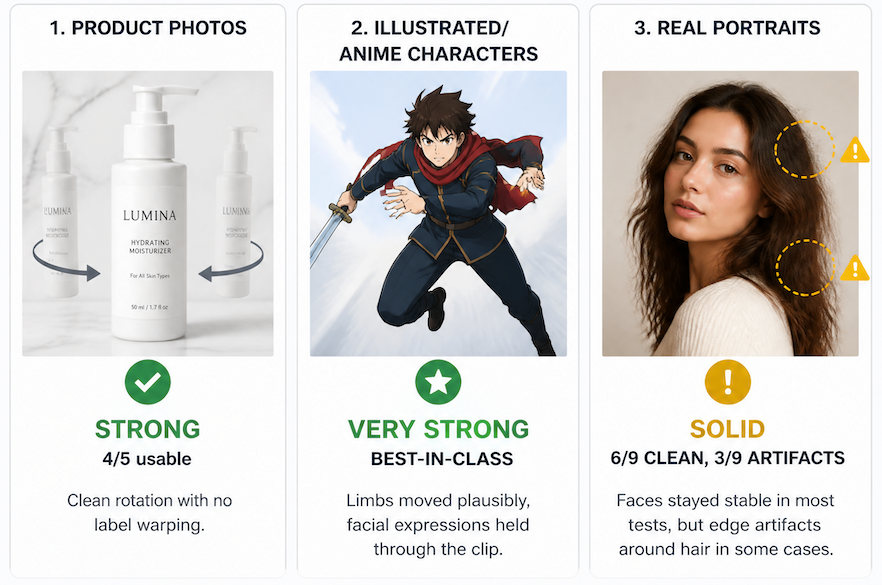
I ran 14 source images across product photos, illustrated characters, and real portraits.
Product photos: Strong. A static skincare bottle on a marble background produced a clean rotation with no label warping. 4 out of 5 passes were usable without any manual touch-up.
Illustrated/anime characters: Very strong. This is where Vidu visibly outperforms most competitors. Limbs moved plausibly, facial expressions held through the clip. If you're building stylized or animated content, this is Vidu's clearest best-in-class case.
Real portraits: Solid but imperfect. Faces stayed stable in most tests, but 3 out of 9 showed edge artifacts around hair — flyaways especially. Noticeable on close inspection, not always visible at scroll speed.
Generation time: 8–12 seconds for a 4-second clip on standard credits.
Character Reference — Keeping the Same Person Across Scenes
I set up a reference profile using 5 images of the same illustrated character (front, three-quarter, profile, with accessory, without). Then I ran 12 generations across different scenes: indoor, outdoor, action pose, product interaction, different lighting.
9 of 12 held clean. The three failures were all high-motion sequences — the model appeared to prioritize motion expressiveness over reference fidelity in those cases.
For the 9 clean generations, consistency was genuinely impressive. Same hairstyle, clothing details, and face structure across completely different backgrounds. If you're using a Vidu AI image to video workflow for serialized content, this is where the tool actually changes the equation.
I built a rough 6-clip test series and they cut together without the "wait, is that the same character?" problem that plagues most multi-clip AI content.
The My References feature saves profiles for reuse — no re-uploading across sessions. Building a character once and pulling from that reference for 40+ clips is a meaningfully different workflow than starting fresh every time.
Motion Range, Length, Watermark
Prompt fidelity for motion type is better than for motion intensity. Prompting "dramatic fast movement" tends to produce something more conservative than expected. The Spicy tier addresses this, but standard I2V clips lean toward restrained motion.
Duration: 4 or 8 seconds standard; up to 16 seconds on extended mode
Resolution: 720p or 1080p (1080p costs 2.2x credits)
Watermark: Free and Standard plans add a small watermark; Premium and above export clean
Export: MP4
Vidu vs. Kling vs. Hailuo
None of these tools is "best." Here's how the comparison breaks down for real workflows.
When Vidu Wins — Character Consistency Workflows
For illustrated or anime-style character content at volume, Vidu's reference system is the most creator-accessible option right now. According to the 2026 I2V model comparison from Atlas Cloud, Vidu Q3 is the only I2V model that generates native audio alongside image-to-video output — other models require a separate audio step.
Multi-reference input (up to 7 images) is also more flexible than Kling's character binding for illustrated content. If your use case is "same character, 30–50 clips per week, different scenes" — test Vidu first.
When Kling or Hailuo Wins
Kling is better for photorealistic human motion. Its character consistency in live-action portrait content outperforms Vidu when working with real photos rather than illustrated references. Kling 3.0 also supports up to 15-second clips natively and has the best multi-language lip-sync.
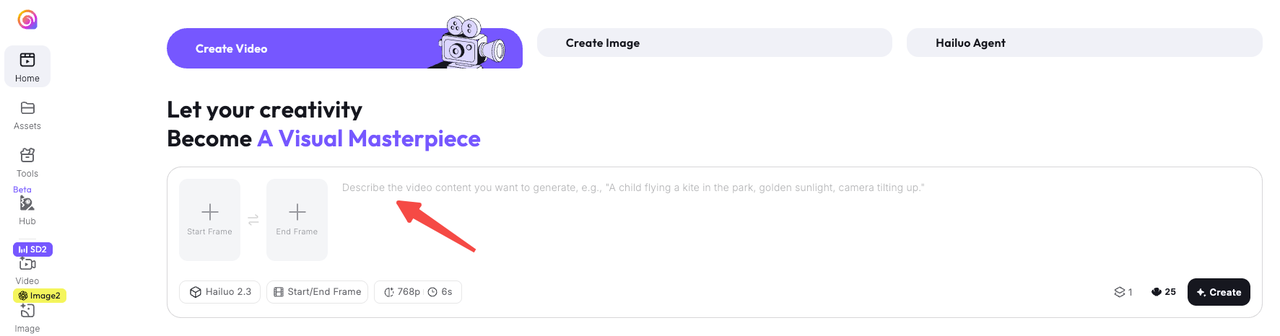
Hailuo wins on text rendering. If your video needs legible on-screen text — product names, pricing callouts — Hailuo 2.3 handles this significantly better than either competitor. It's also cheaper per generation.
Short version: Vidu for illustrated character series. Kling for live-action portrait content. Hailuo when text needs to be readable.
Best Use Cases for Creators
Serialized Character Content
Vidu's clearest strength. In my testing, I went from spending 12–15 minutes fixing consistency issues between clips down to 3–5 minutes of minor adjustments per series. That compounds across a full week of production.
Product Videos with Consistent Model
For e-commerce teams, Vidu's object consistency works similarly to character consistency. Upload reference images of a specific product, and the model maintains its visual identity across different scene backgrounds — useful for social media testing and concept variations at scale.
Short Narrative/Skit Content
Vidu Q3's anime output quality is strong enough for short narrative sequences where live-action footage isn't practical. For creators building illustrated short-form stories, this is probably the most cost-effective path in 2026 that doesn't require a team.
Limitations
Fast motion breaks consistency. High-energy sequences showed reference drift in 3 of my 12 tests. If your style is high-energy, test this specifically before committing to a workflow.
Real portrait consistency is weaker than illustrated. Vidu is optimized for stylized content. Kling does photorealistic human faces better.
No timeline control. Vidu uses prompt-based editing. Frame-accurate control isn't available — you'd need to export and bring clips into an editing tool.
16 seconds is the ceiling. Longer content requires clip stitching, which is a workflow step worth accounting for.
From Vidu Output to Publishable Short
Here's what I want to be honest about: Vidu generates the clip. It doesn't handle multi-clip assembly, pacing, caption overlay, hook structure, or platform-specific export sizing.
For a serialized 60-second short built from 6–8 Vidu clips, the post-generation workflow still includes rough assembly, hook structure, caption pass, audio sync, and export. That editorial layer — taking AI-generated clips and turning them into something with a working opening 3 seconds and a coherent narrative — is a separate step. Something like NemoVideo handles the assembly, captioning, and pacing that Vidu doesn't touch. Think of Vidu as the clip generator. The editorial pass comes after.
FAQ
Is Vidu free? Yes — 80 credits per month plus unlimited off-peak generation. Off-peak is slower but sufficient for evaluation.
Commercial use allowed? Paid plans allow commercial use. Free tier content carries watermarks with different rights. Verify on the Vidu official site before publishing commercially.
Does character consistency really work? For illustrated/anime content: yes, noticeably — 9 of 12 generations held clean in my testing. For live-action portraits: less consistent, especially under fast motion. Kling performs better there.
Outside China region access? Accessible globally. No regional restrictions in US or EU testing. Generation speed can vary during peak hours.
Verdict
Vidu AI image to video is the right tool for a specific kind of creator: people building serialized illustrated content, anime-style short series, or product video pools where consistent visual identity matters more than cinematic realism.
It's not the all-purpose I2V winner. Kling does photorealistic human motion better. Hailuo renders text better. But for the character-series workflow — building reference profiles and generating 30+ clips per week from them — Vidu is the most creator-accessible option I've tested that doesn't require deep technical setup.
If that's your use case, the free off-peak tier is enough to evaluate it properly. If you need live-action photorealism or frame-accurate editing control, start with Kling instead.
Previous Posts: